Kriti: the Bangla Font Manager

Bengali is spoken by over 230 million people around the world. It is the language of poetry, literature, everyday conversation, and increasingly the internet. Yet anyone who has tried to make something beautiful in Bengali on a screen knows the struggle: finding a good font means hours of hunting across obscure websites, downloading mystery ZIP files, and hoping the font actually renders correctly. Kriti was made to fix that.
What Is Kriti?
Kriti is a free Bengali font library, a single place where you can browse, preview, and use over 45 Bengali fonts(300 variants), all in one website.
Think of it as a Bengali version of Google Fonts, but more comprehensive and focused entirely on Bangla typography. Whether you are a student working on a poster, a designer building a brand, a developer adding Bengali to a website, or simply someone who loves beautiful Bangla script, Kriti is for you.
The Problem It Solves
Before Kriti, finding Bengali fonts was genuinely painful:
You had to visit many different websites. Bengali fonts were scattered across dozens of separate websites and personal blogs. There was no single place to see them all.
You couldn't tell if a font would actually work. Many older Bengali fonts use a legacy encoding called ANSI, which does not work on modern phones, browsers, or apps. They look fine as a file name but produce gibberish when you type in Bengali. There was no easy way to know which fonts were safe to use and which weren't.
Licensing was a mystery. Some fonts are free to use in any project. Others are free for personal use only. Some cannot be shared at all. Most fonts gave no clear answer. Using the wrong font in a commercial project can cause real problems.
There was no easy way to use fonts on a website. Developers had to download fonts, host them themselves, and figure out all the configuration, a lot of work just to get a nice Bangla font on a webpage.
Kriti solves all of this.
Browsing the Library
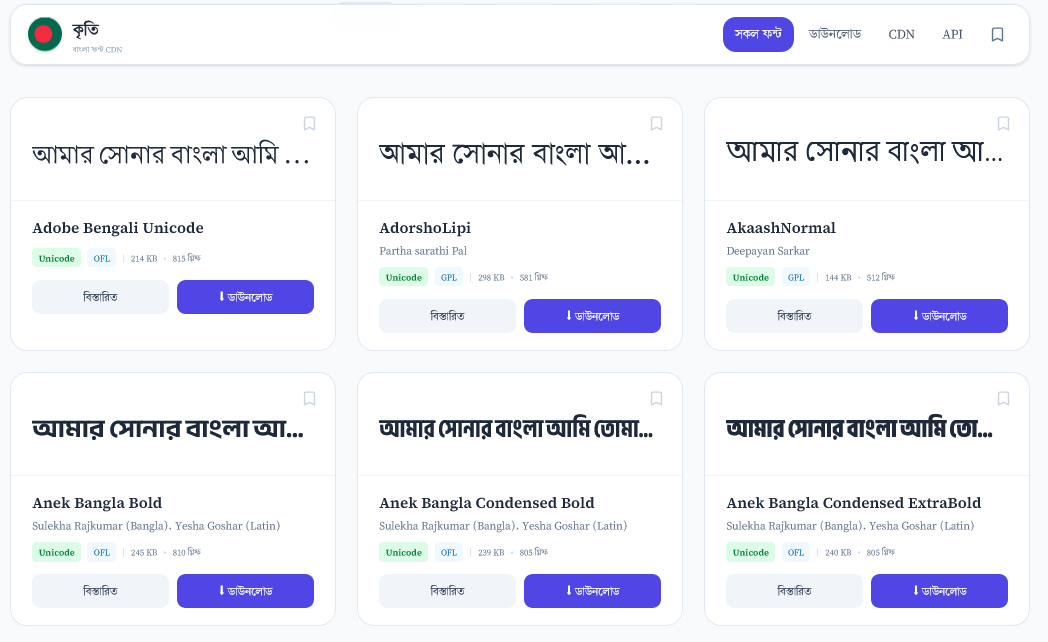
When you open kriti.app, you see the full collection of 45+ fonts laid out as cards. Every card shows the font name and a preview of the font rendered in actual Bengali text, so you can immediately see how it looks without clicking anything.
You can search by name by typing in the search box and results update instantly.
You can also filter the collection:
- Lenience(OFL,GPL,CC,Government)
- ইউনিকোড (Unicode) - fonts that work correctly on all modern devices
- ANSI - legacy fonts, shown so you know they exist but with a clear warning
Every Font Has Its Own Page
Click on any font and you get a dedicated page with everything you need to know about it.
Live preview - Type your own text and see it rendered in the font in real time. Change the size. See exactly how your words will look.
Character waterfall - A full display of every Bengali character, number, and punctuation mark the font supports, shown in descending sizes. Great for checking if the font covers the full script.
Glyph grid - A grid showing every individual glyph in the font. Useful for designers who need to know exactly what the font contains.
Information table - Designer name, license type, whether the font is Unicode or ANSI, how many glyphs it has, and which scripts it covers.
Every free font page also shows a download button and a ready-to-use code snippet for adding it to a website.
Using Fonts on a Website - The Kriti CDN
For web developers and anyone running a website or blog in Bengali, Kriti offers a free CDN (Content Delivery Network) for all the openly licensed fonts in the collection.
This means you can add a beautiful Bengali font to any website with a single line of code, no downloading, no hosting, no configuration. Just paste the link and it works:
<link rel="stylesheet" href="https://kriti.app/cdn/243dasa3.css">
Then use it in your styles:
body {
  font-family: 'Kalpurush', sans-serif;
}
That's it. The font loads from Kriti's global servers, fast, from wherever your visitors are in the world. It works the same way as Google Fonts, except it's specifically for Bengali.
The CDN currently serves around 45 freely licensed fonts, all in the most efficient web format so pages load as fast as possible.
Installing Fonts on Your Computer
Windows
Download and run the installer to get all free Bengali fonts on your Windows PC:
Download Kriti for Windows (v0.1.0, 64-bit)
After installation, the fonts appear in every application on your computer automatically, including Word, Photoshop, LibreOffice, and everything else.
Linux and macOS
If you use Linux or macOS, there is a one-command installer. Open a terminal and run:
curl -fsSL https://kriti.app/install.sh | bash
That's it. The script downloads every free Bengali font and installs them into your font folder. After it finishes, the fonts appear in every application on your computer automatically.
It works on Ubuntu, Debian, Fedora, Arch Linux, Alpine Linux, and macOS.
You can also visit the downloads page for more options.
Free vs. Proprietary Fonts - What's the Difference?
Kriti is transparent about licensing so you always know what you're getting.
Free fonts (marked ফ্রি) are released under open licenses. You can use them in personal projects, commercial projects, websites, apps, publications, anything. You can also share them freely. These are the fonts available for download and on the CDN.
Proprietary fonts (marked প্রাইভেট) are fonts whose creators have reserved their rights. Kriti still shows them in the directory with previews so you can discover them, but links you to the original source to obtain the font properly. Kriti does not distribute these fonts.
This distinction matters. Kriti makes it impossible to accidentally use a proprietary font thinking it was free.
Unicode vs. ANSI - Why It Matters
You may notice some fonts are labelled ANSI. Here is what that means in plain language:
Modern Bengali fonts use Unicode, the universal standard for encoding text. A Unicode Bengali font works everywhere: in browsers, in WhatsApp, in Word, in any modern app. When you type "আমার সোনার বাংলা" using a Unicode font, it stays "আমার সোনার বাংলা" everywhere.
Older ANSI fonts use a private encoding that only works if the software specifically supports that font. If you use an ANSI font on a website, visitors who don't have that exact font installed see garbled characters or boxes. ANSI fonts are also not searchable, text set in ANSI fonts cannot be copied and searched online.
Kriti clearly labels every font so you always know which type you're looking at. For anything intended for the web or modern devices, always choose Unicode.
Who Is Kriti For?
Students and writers - Browse and download beautiful Bengali fonts for your documents, posters, and presentations. Everything free is one click away.
Graphic designers - Preview hundreds of Bengali typefaces side by side, check full character sets, and find the perfect font for a project without leaving one page.
Web developers - Add Bengali fonts to any website with a single line of code using the free CDN. No hosting required.
Publishers and content creators - Discover fonts you didn't know existed, and know instantly whether you can legally use them in your publication.
Bengali language enthusiasts - Explore the full range of Bengali typography, from traditional calligraphic styles to modern geometric designs, all in one place.
It's Completely Free
Kriti is free to use. The directory, the search, the previews, the CDN, the font installer, all of it. No account needed, no sign-up, no ads.
The freely licensed fonts are also free forever, by the terms of their licenses. You can build a commercial Bengali website using Kriti's CDN today and rely on it remaining free.
Visit kriti.app and find your next Bengali font. And Pray for me. Thanks.